Tampilkan postingan dengan label Facebook Article. Tampilkan semua postingan

Facebook releases Interest List feature


Facebook releases Interest List feature - Facebook again to bring new features to enrich the user experience as social networking. 'Interest List', a group the way Facebook popular topics for easy reference.

This feature functions like a 'List' on Twitter, which is that users can search for friends or a page in accordance with their interests. Interest Lists of topics including technology, arts, entertainment, music and sports. This feature is also similar to the Circle in Google+, that allows the user to follow a particular person or any particular page.

Reported by detikInet, Friday (03/09/2012), Facebook users can create their own lists and other Facebook users can follow to subscribe. Among other benefits, this feature also makes the majority of Facebook users do not need to subscribe to a lot of Facebook Pages to see all of their content updates.

With the Interest List, at the sight of Facebook feeds, update from the Facebook Page who were followed will be grouped in a subscription that has been grouped by topic, not again 'litter' in Facebook feed with all updates post.

The advertisers will benefit from this capability because they can promote in the list. But Facebook users might be distracted by the number of updates of a page that will flood the Facebook feed.

That is why, Facebook users should be careful to determine the number of pages that follow in order not to disturb any updates.

5 Tips for Preventing Malware Safe on Facebook

Facebook popularity provoked interest in the cyber criminals to spread malicious programs on the social networking site. Sensational video titles often fooling users, but it's just a trap.

Here are 5 tips to ward safe, cited by detikINET of Eset security company on Friday (08/19/2011).

1. Always use security software on a computer, equipped with high performing antivirus, and do not forget to always update it.

2. Always be aware if there is a suspicious conversation. Example, chat with a foreign language and a strange arrangement of letters.

3. Avoid clicking on strange links. Typically, related porn videos and other things it called sensational.

4. Adjust the level of security and privacy settings on social networking sites.

5. There are many applications that are published by third parties as a result of work of the suspected perpetrators of cyber crimes and go as spam in the user's computer. So you must not download applications that are not clear origin.

Source of quote: detikinet.com
(in Indonesian)
Source image: internet

Hopefully helpful!


How to See Who's on Facebook From Beginning Until Now

Your facebook user? If you facebook users and frequent use of this service, would have a lot of updated status and are not counted again. Facebook is one of the largest social networking today and have a lot to use it.

If you include an active user of this service, various kinds of status that may have been updated from the very first time to use it. But still remember the first updated status or status in your facebook account?

At this time I will share, how to display the status we on facebook, from the beginning until now.

1. Log in to your facebook account
2. Type in a new tab on the browser used http://apps.facebook.com/mystatuses/newestfirst
3. Give access these applications with the click Allow
4. If successful, you will see all our status from the beginning to the last update the status.

Hopefully with this application you can see all the status that you have ever typed/update on facebook.


10 Hidden Keys on Facebook

Most of us already have a facebook account. Facebook is one social network that was popular at the moment.

Below are 10 key secrets facebook:

shift + alt + 1 = home
shift + alt + 2 = profile
shift + alt + 3 = request
shift + alt + 4 = Message
shift + alt + 5 = notice
shift + alt + 6 = edit accounts
shift + alt + 7 = privacy settings
shift + alt + 8 = Fan facebook
shift + alt + 9 = statement of rights and responsibilities
shift + alt + 0 = center help

Similarly, 10 hidden button on facebook, may be helpful for the users facebook account.


Enlarge Photo on Facebook Without Clicking Links

When we are on the facebook page, often times we want to see pictures or photos uploaded by colleagues / friends on facebook. But as always to see the pictures or the photos we first have to click on a link or image in order to appear larger. Well at this time, as the experience I have gained, there is one of the applications or add ons that allows you to enlarge pictures or photos that we want to see on facebook page without clicking a link or image to make it look great, but we simply point the mouse is used to pictures or photographs.

With this application of course we can save you time also saves Internet bandwidth is used.

Well .. for a colleague or friend who wants to try the applications or add ons this straight:

First

For that use the Mozilla Firefox browser, Install up PhotoZoom and click here
http://addons.mozilla.org/en-US/firefox/addon/125440/
While using Google Chrome to install up PhotoZoom click here
http://chrome.google.com//extensions/detail/elioihkkcdgakfbahdoddophfngopipi

Second

Once installed, look at the bottom right corner there are icons fecebook PhotoZoom is up and running.

Third

Login to facebook of course with my friend and comrade ID upon entering the facebook page, point maouse pointers to the images that you want to see it will come out picture / photo enlarged thumbnail.

Fourth

Good luck ...

Hopefully useful.


Writing in Arabic Text With Facebook Status

Facebook status can be written with the text upside down, we can also write with arabic letters on our facebook status.

To write Arabic letters on our facebook status, the steps are as follows:

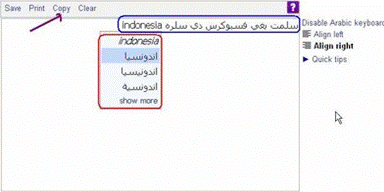
1. Visit http://www.yamli.com/arabic-keyboard/

2. Type or write a sentence that will be converted into writing arabic (blue box), and will automatically appear arabic typeface choices (red box), then select one of these fonts and then click copy (purple arrows)


3. The next step to take Arabic writing that is so, just click copy and insert it into the facebook status.


Hopefully Helpful.


Writing Text Reversed on Facebook Status

Writing facebook status with the text upside down of course looks funny and interesting, but it is definitely reading too little confusion and forced to turn his head or the computer used.

To make the text upside down on facebook status we can use one of the free service from http://www.sherv.net, and the way he is also very simple:

1. Visit http://www.sherv.net/flip.html of webbrowser used.
2. Type or write the sentence that you want to write upside down in the first column and reversed itself writing will immediately appear in the second column.


3. When you finish typing or writing a sentence that you want, copy writing upside down on the bottom box or "Use this text for emails and websites (blogs, profiles, comments, etc)".


4. Paste in the status of facebook and see the results of the paper is upside down.

Hopefully Helpful.


Submit Facebook Account to The Google Search Engine

Just as your website or blog, facebook account, we can also apply the technique in order to go in search listings on search engines. The technique is useful when we make our facebook as a media business or a business. By applying this technique, in the hope that the search engine could index our facebook profile page.

One technique that can be applied on facebook is to our facebook account ID Submit to google search engine.

Step - step submit ID to your facebook account :

1. Note the first ID akunt our facebook.

2. if we do not know our facebook ID, click the facebook profile and see in the browser on your computer then copy that we use to name our Id.

3. After noting our facebook account ID, we begin to submit to google search engine :

4. http://google.com/addurl visit in your browser, enter the ID facebook account was in the box provided (the URL for the ID account up and Comments fill with our name on facebook).

5. After that, Click Add URL.


How to Create a Facebook Account

Facebook is one social network media site that can be used as a place to interact with different people from around the world. Facebook can also be used as a medium of friendship and business.

For most Internet users, Facebook now has become a necessity. This is a proof that facebook is needed for them, because not only chat (chat) provided up as facility users but also can send emails, make friends, create their own group, advertising, and other facilities which are all very easy to learn even by the beginner.

At this time I will share experiences on how to make or sign up on facebook, as for the steps are as follows:

1. To sign up on facebook as the first condition must have an active e-mail, if not please make it first and see how here or here.

2. Visit http://facebook.com of webbrowser used.

3. Once inside facebook page, fill out the registration form and click "Sign up".

4. At the security check, write what you see, then click "Sign up".

5. Follow the next steps, fill out the form and then click Skip this step.

6. Click Save & Continue.

7. Upload Photos to be a profile or may later, click Save & Continue.

8. Up here you have already signed up to Facebook, but kenggotaan you do not already active. To activate membership, you must verify it.

9. Open the e-mail address used to register you, click the verification link from facebook.

10. After that you will be taken on the facebook page, it means you have activated your membership and are ready to use the facilities up. Here you can do the setting-setting, making friends, edit profile, upload photos, chat, and so forth.